 JavaWeb
 Spring
 MyBatis
 linux
linux
 消息队列
消息队列
 JavaSE
 工具
工具
 片段
片段
 AI
AI
 搜索
搜索
 dy
dy
LangGraph
你将学会: 用节点和边自己规定流程;先跑无 LLM 的图,再跑带工具的循环。
前置: L02。只有 create_agent 的固定循环绑不住你时,才需要这一课。

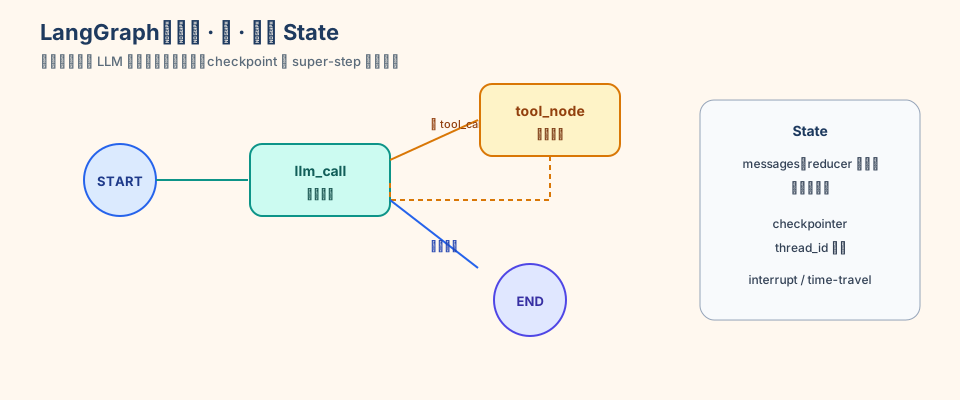
典型信号:必须先校验格式,再决定是否调用模型;或「工具 A 成功才允许工具 B」。
1. 无 LLM:看清 reducer(不需要 API key)
未标注的字段会被覆盖。列表要追加,用 Annotated[..., operator.add]。
from typing import Annotated

import operator
from langgraph.graph import END, START, StateGraph
from typing_extensions import TypedDict


class State(TypedDict):
    foo: int
    bar: Annotated[list[str], operator.add]


def node_a(state: State):
    return {"foo": 2, "bar": ["a"]}


def node_b(state: State):
    return {"foo": 3, "bar": ["b"]}


graph = (
    StateGraph(State)
    .add_node("a", node_a)
    .add_node("b", node_b)
    .add_edge(START, "a")
    .add_edge("a", "b")
    .add_edge("b", END)
    .compile()
)
print(graph.get_graph().draw_mermaid())
print(graph.invoke({"foo": 1, "bar": ["start"]}))
# foo 变成 3(被覆盖),bar 变成 ['start','a','b'](追加)
2. 自己写工具循环(需要 API key)
这就是 create_agent 内部在做的事。写一遍为了看懂,日常仍优先 create_agent。
from dotenv import load_dotenv

load_dotenv()

from typing import Annotated, Literal

import operator
from langchain.chat_models import init_chat_model
from langchain.messages import AnyMessage, HumanMessage, SystemMessage, ToolMessage
from langchain.tools import tool
from langgraph.graph import END, START, StateGraph
from typing_extensions import TypedDict

model = init_chat_model(
    "deepseek:deepseek-chat",
    temperature=0,
    max_tokens=2500,
    timeout=300,
    max_retries=6,
)


@tool
def add(a: int, b: int) -> int:
    """Adds a and b."""
    return a + b


tools_by_name = {add.name: add}
bound = model.bind_tools([add])


class S(TypedDict):
    messages: Annotated[list[AnyMessage], operator.add]


def llm_call(state: S):
    return {"messages": [bound.invoke(
        [SystemMessage(content="需要计算时调用工具。")] + state["messages"]
    )]}


def tool_node(state: S):
    msgs = []
    for tc in state["messages"][-1].tool_calls:
        msgs.append(ToolMessage(
            content=str(tools_by_name[tc["name"]].invoke(tc["args"])),
            tool_call_id=tc["id"],
        ))
    return {"messages": msgs}


def route(state: S) -> Literal["tool_node", "__end__"]:
    return "tool_node" if getattr(state["messages"][-1], "tool_calls", None) else END


g = (
    StateGraph(S)
    .add_node("llm_call", llm_call)
    .add_node("tool_node", tool_node)
    .add_edge(START, "llm_call")
    .add_conditional_edges("llm_call", route, ["tool_node", END])
    .add_edge("tool_node", "llm_call")
    .compile()
)
out = g.invoke({"messages": [HumanMessage(content="Add 3 and 4.")]})
for m in out["messages"]:
    m.pretty_print()
HITL、时间旅行、Functional API(@entrypoint)见仓库 13-LangGraph/。日常仍优先 create_agent;只有循环绑不住时才自己画图。
3. 关掉进程还能记住:SqliteSaver(不需要 API key)
InMemorySaver 随进程消失。本地单机用 SqliteSaver;多进程再用 Postgres。durability 写在 invoke 上,不在 compile。
from pathlib import Path
from typing import Annotated

import operator
from langgraph.checkpoint.sqlite import SqliteSaver
from langgraph.graph import END, START, StateGraph
from typing_extensions import TypedDict


class S(TypedDict):
    log: Annotated[list[str], operator.add]


def tick(state: S):
    return {"log": ["tick"]}


db = Path("_tmp_l10.sqlite")
cfg = {"configurable": {"thread_id": "persist-1"}}

with SqliteSaver.from_conn_string(str(db)) as saver:
    saver.setup()
    g = (
        StateGraph(S)
        .add_node("tick", tick)
        .add_edge(START, "tick")
        .add_edge("tick", END)
        .compile(checkpointer=saver)
    )
    print("第 1 次 =>", g.invoke({"log": ["start"]}, config=cfg, durability="sync"))
    print("第 2 次 =>", g.invoke({"log": []}, config=cfg, durability="sync"))

print("db 还在 =>", db.exists(), db.resolve())
第二次应看到 log 里有两个 "tick":状态写进了 sqlite 文件,不是只活在内存里。create_agent(..., checkpointer=saver) 是同一套机制。跑完可删 _tmp_l10.sqlite。
durability:async 后台写(默认)、sync 每步落盘(HITL / 不能丢状态)、exit 只在图结束时写。
练习
- 无 LLM 图里再加
node_c,让bar再追加"c"。 - 口述:
create_agent帮你省掉了上面第 2 段里的哪些代码? - SqliteSaver 脚本再
invoke一次,确认log更长;删掉_tmp_l10.sqlite重跑,确认从start重新开始。
本章验收
- 能解释覆盖 vs reducer 追加
- 能跑通无 LLM 的图
- 能用 SqliteSaver 让状态落到文件
- 能判断什么时候不必自己画图
对照仓库:13-LangGraph/Graph-API图API.py、Sqlite-checkpointer生产持久化.py
下一课:Deep Agents